A browser that makes you pause
What I learned building a browser extension that highlights discriminatory language without telling readers what to think.
critical reading · responsible AI · product building
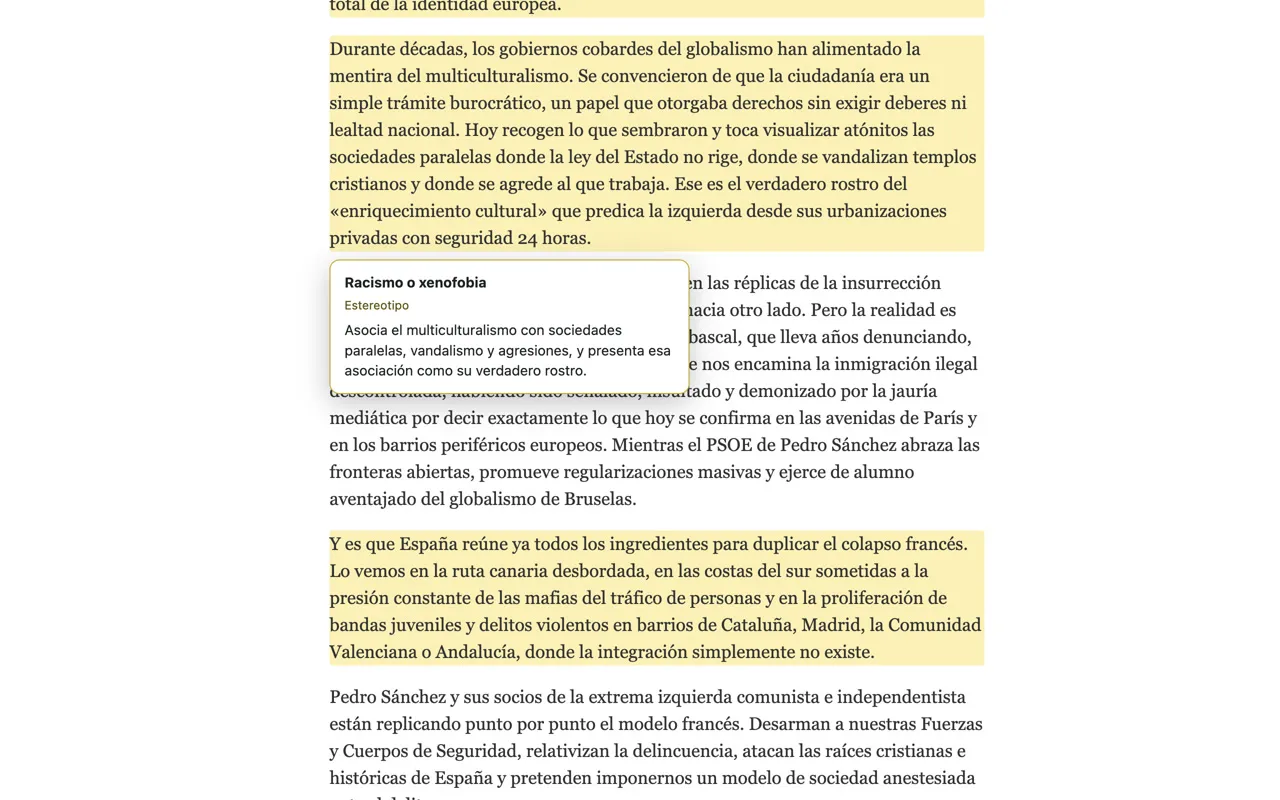
I built Critical Reader because I kept having the same uncomfortable experience: I would sense that a sentence was discriminatory, but I did not always have the vocabulary to explain why.
The project became a small Chrome extension. When the reader explicitly asks it to analyse a Spanish-language article, it highlights clear expressions and explains the relevant category. It does not label the publication, judge the author, or decide what the reader should think.
The missing vocabulary
Critical reading is easier when you can name what you are noticing. A vague reaction—“there is something wrong here”—can be a useful signal, but it is difficult to examine or discuss.
The first product question was therefore not “Can AI classify an article?” It was “Can a browser tool give someone just enough language to look again?” That distinction changed the interface. The extension stays quiet until requested, works on the page the person is already reading, and points to specific paragraphs rather than producing a verdict about the whole text.
The browser already has enough opinions.
The useful intervention was a pause and a vocabulary prompt, not another confident voice competing for the final word.
This made the scope deliberately narrower. Narrowness is often useful product work: it reduces the promise until the promise becomes honest.
A highlight, not a verdict
The central design choice is the highlight. It keeps the original words visible and leaves interpretation with the reader. The explanation can say what pattern the expression resembles, but the surrounding argument is still there to inspect.
That also creates a clear boundary for the model. Critical Reader should surface expressions that are sufficiently explicit to explain. It should not infer an author’s intentions, diagnose an entire publication, or turn ambiguity into certainty simply because a model can produce a sentence about it.
Highlighters are modest tools.
They do not rewrite the book, win the argument, or finish the exam. They merely make it harder to pretend you did not see the line.
The extension runs only when the reader activates it. This is important both for privacy and for the experience: analysis is an intentional action, not an invisible layer continuously judging every page.
Building with AI, not delegating judgment
AI helped me move from a personal learning need to a working beta. I used it to explore the extension architecture, iterate on prompts, debug the browser integration, and turn design decisions into code more quickly.
But speed does not remove product responsibility. Someone still has to decide what the tool claims, where it should remain silent, how explanations are phrased, what happens when evidence is weak, and which mistakes would be unacceptable.
“The model said so” is not a product principle.
It is closer to an incident report written before the incident.
That is the part of AI-assisted building I find most interesting. The implementation distance gets shorter, so judgment becomes more visible. You can test an idea sooner, but you also meet its uncomfortable questions sooner.
Critical Reader is still a beta. Its value is not that it can settle a reading. It is that, occasionally, it can make a reader slow down, name a pattern, and continue with a better question.